These posts are being re-created from old Jamf Nation posts not because they are the best but because they may have useful things that were mangled in the Jamf Nation transition to its most recent hosting platform.
That, & they were always supposed to be blog posts anyway… I didn’t have a blog then.
https://community.jamf.com/search/activity/reactions?userid=45006One great thing about JAMF Nation is that awesome workflows can be shared so easily. Sometimes, however, ones that are slightly less than optimal get propagated. The other day I happened to come across an instance of this that I thought maybe I could help explain.
The extension attribute in question:
#!/bin/sh
echo "<result>$(dscl . list /Users UniqueID | awk '$2>500{print $1}' | wc -l | sed 's/^ *//g')</result>"
First, counting lines with wc is probably not the best way to count the members of an array.
On my computer this command yields 2 results:
brock$ dscl . list /Users UniqueID | awk '$2>500{print $1}'
brock
test
Those 2 results can be captured in an array:
array=($(dscl . list /Users UniqueID | awk '$2>500{print $1}'))
& counted like this:
brock$ echo "${#array[@]}"
2
Second, the 1-liner above does not handle common cases you would want to capture with an extension attribute:
- an end user creating an unauthorized user account with a UID under 500 in the GUI
- authorized user accounts created by an application or by Server.app with UID under 500
If your organization has determined that something like this is important… think about the deployment. For example, maybe you know that:
- all computers are required to run the most current version of the OS
- the user account assigned to UID 501 is created programmatically during provisioning or by IT staff
- user accounts created by an end user in the GUI or by Server.app other than UID 501 are unauthorized
- end users do not know how or do not have privileges to change the UID for their user account
With these assumptions something can be built that will result in getting good information to help remediate the problem.
The current user accounts on the managed computer are needed for a comparison to a list of known-good, authorized user accounts - often. This is really the only way to ensure that the user accounts that exist are authorized or not.
One idea might be to include the following script as a payload in your Update Inventory policy in the JSS:
#!/bin/bash


# jss.authusr.sh
# ©2016 brock walters jamf

# this script works under the following assumptions:

# - the user account assigned to UID 501 is created programmatically during provisioning or by IT staff
# - user accounts created by an end user in the GUI or by Server.app other than UID 501 are unauthorized
# - end users do not know how or do not have privileges to change the UID for their user account

# this script can be used in 1 of the following 3 ways:

# 1) adding a comma-separated or space-separated list to the parameter 4 field when using the script as the
#    payload in a JSS policy

# 2) passing a comma-separated or space-separated list as argument 4 of the command to run the script

# 3) hard-coding a comma-separated or space-separated list into the "AuthorizedUserAccounts" variable below
#    e.g., AuthorizedUsers="_secretITaccount,mattdaemon,unclenobody" etc...


AuthorizedUserAccounts=""


#########################################
########## DO NOT MODIFY BELOW ##########
#########################################


AuthorizedUserAccounts="${AuthorizedUserAccounts:-$4}"
addauth=($(echo "$AuthorizedUserAccounts" | /usr/bin/sed 's/,/ /g'))
sysauth=(daemon Guest nobody root _amavisd _appleevents _appowner _appserver _ard _assetcache _astris _atsserver _avbdeviced _calendar _ces _clamav _coreaudiod _coremediaiod _cvmsroot _cvs _cyrus _devdocs _devicemgr _displaypolicyd _distnote _dovecot _dovenull _dpaudio _eppc _ftp _geod _iconservices _installassistant _installer _jabber _kadmin_admin _kadmin_changepw _krb_anonymous _krb_changepw _krb_kadmin _krb_kerberos _krb_krbtgt _krbfast _krbtgt _launchservicesd _lda _locationd _lp _mailman _mcxalr _mdnsresponder _mysql _netbios _netstatistics _networkd _nsurlsessiond _nsurlstoraged _postfix _postgres _qtss _sandbox _screensaver _scsd _securityagent _serialnumberd _softwareupdate _spotlight _sshd _svn _taskgated _teamsserver _timezone _tokend _trustevaluationagent _unknown _update_sharing _usbmuxd _uucp _warmd _webauthserver _windowserver _www)
usercat=("${addauth[@]}" "${sysauth[@]}")

echo "${usercat[@]}" | /usr/bin/base64 > /private/tmp/authusr.b64
This includes the user account names of all the underscore system user accounts & the known non-underscore user accounts created by the OS: daemon, Guest, nobody, root. The idea is that these user accounts are “authorized” so they should be excluded from your search for unauthorized user accounts.
The script also lets you add more authorized user accounts specific to your environment:
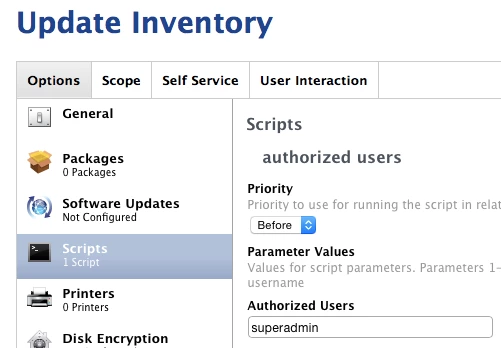
- In the parameter 4 field of the script in the JSS.
- By passing in a list to argument 4 when you execute the script.
- By hard-coding them into the
AuthorizedUserAccountsvariable.
These authorized user accounts are written to a temporary file which is encoded. You may think this is fussy - it could be approached differently. My thought was - I don’t want my average end user to know which user accounts are authorized or not. I also don’t want them to be able to very easily add an “authorized” user account of their own to the list!
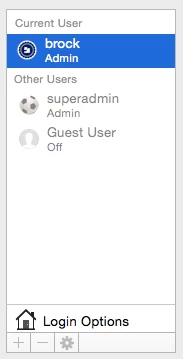
Maybe your organization creates an account on all computers called superadmin.
You could populate the parameter 4 field of the script settings in the JSS with superadmin to exempt this authorized user account.
The 2nd part of my strategy would be an extension attribute that looked at the comparison between the authorized & unauthorized user accounts. Since the script above would run every time a computer submitted inventory, the extension attribute would be updated immediately every time that happened.
#!/bin/bash


# jss.xat.authusr.sh
# ©2016 brock walters jamf

# used in conjunction with a script to create a list of known-good authorized users
# this JSS extension attribute will display "No Unauthorized User Accounts" if 0
# non-system or unauthorized accounts exist.

# the value can be used as a JSS Smart Group criteria.

# if the variable "UnauthorizedUserAccounts" is populated the unauthorized user account UIDs
# will populate the JSS extension attribute field instead, e.g., "250 502 503 504"


# read list of user accounts, exempt authorized users, convert user account names to UID
authusr=($(/usr/bin/base64 -D -i /private/tmp/authusr.b64))
usrxmpt=$(for i in "${authusr[@]}";do /bin/echo -n "/^$i$/d;";done)
userlst=($(/usr/bin/dscl . -list /Users | /usr/bin/sed "$usrxmpt"))
useruid=($(for j in "${userlst[@]}";do /usr/bin/id -u "$j";done))


# conditional check for unauthorized users
UnauthorizedUserAccounts=($(echo "${useruid[@]//501/}"))

if [[ -z "${UnauthorizedUserAccounts[@]}" ]]
then
    echo "<result>No Unauthorized User Accounts</result>"
else
    echo "<result>${UnauthorizedUserAccounts[@]}</result>"
fi

/bin/rm -f /private/tmp/authusr.b64
The extension attribute script is reading the temporary list of known-good, authorized user accounts, comparing that to the current user accounts on the computer, exempting the authorized accounts, then populating the extension attribute field. If the result is “No Unauthorized User Accounts”, you’re golden.
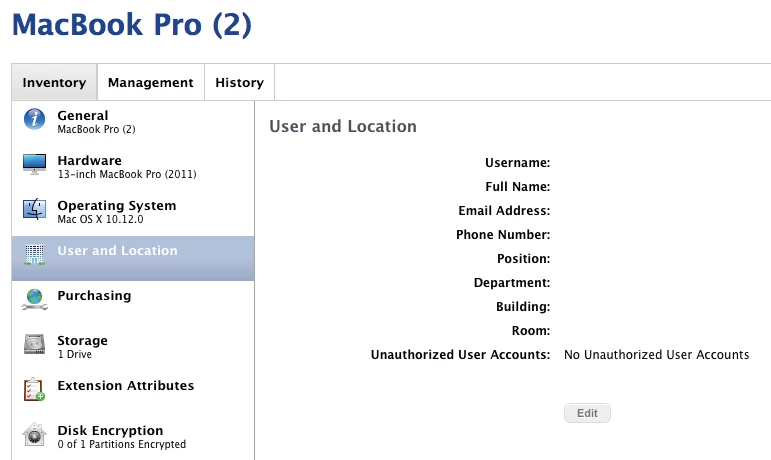
Otherwise, the extension attribute is populated with the UIDs of all unauthorized user accounts.
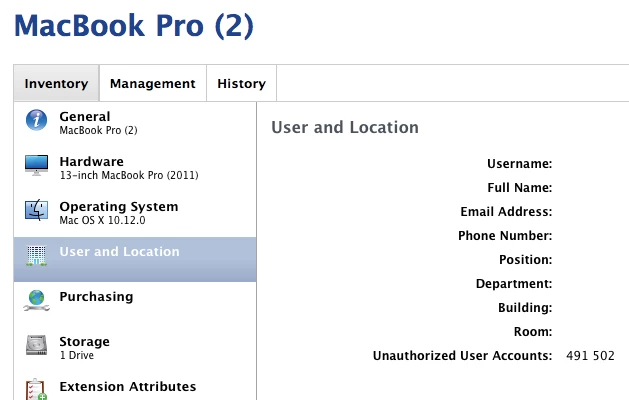
Having the UIDs will let you take further action if need be to get rid of bob’s potentially hidden account or fred’s account.
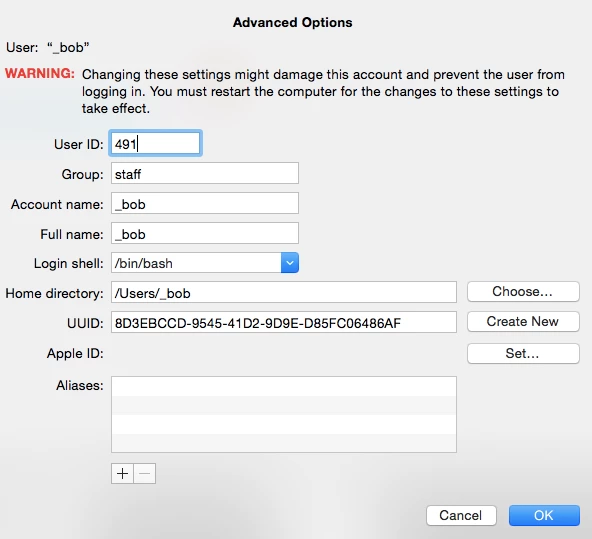
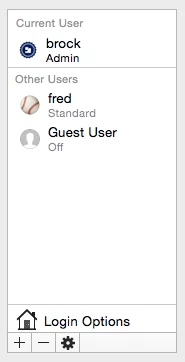
I hope this is helpful. Feel free to nitpick my solution to death or ask questions! Thanks!
Source: https://community.jamf.com/general-discussions-2/thinking-about-extension-attributes-13270
Comments Link to heading
peterlbkJamf Heroes
September 25, 2016
Hi @brock.walters,
just ran a test of this wonderful script on my 10.11 - 10.12 test machines.
I added a few accounts to your sysauth list - do you think these need to be added to the general list?
_applepay _mbsetupuser _captiveagent _ctkd _datadetectors _findmydevice _gamecontrollerd _hidd _mobileasset _ondemand _wwwproxy _xcsbuildagent _xcscredserver _xserverdocs
brock_walters
Author
Employee
September 26, 2016
Yes. My list did not include the users added in macOS Sierra 10.12. You can add whatever user accounts in that list you need or simply add them to the parameter field as needed. Part of the reason a generic solution won’t work (i.e., the bad extension attribute example at the top) is that everyone’s environment may have different authorized user accounts or the authorized user accounts may change over time or there may be different accounts needed for different parts of your deployment. This workflow is modular - you could have different versions of the Update Inventory policy with different user account lists & the extension attribute would still work the same. Thanks!