NOTE: These posts are being re-created from old Jamf Nation posts not because they are the best but because they may have useful things that were mangled in the Jamf Nation transition to its most recent hosting platform.
That, & they were always supposed to be blog posts anyway… I didn’t have a blog then.
A while back I posted very excitedly about an update to the du binary. I forgot to post that I actually used it for something…
We pushed Druva into production earlier this year for all clients (macOS & Windows). In my opinion Druva is the gold standard for cloud backup.
Before pushing it out, we wanted to know how much data lived in everyone’s home folder & the sub-folders. So, of course I made a multi-line Jamf Pro extension attribute…
#!/bin/sh

# macOS version check
if [ "$(/usr/bin/sw_vers -productVersion | /usr/bin/awk -F '.' '{print $1}')" -ge 12 ]
then
    byteblk='--si'
else
    byteblk='-h'
fi

# collect home folder size (collects size of dot files but excludes from display)
crntusr="$(/usr/bin/stat -f %Su /dev/console)"
dscldir="$(/usr/bin/dscl -plist . read /Users/"$crntusr" NFSHomeDirectory)"
homedir="$(/usr/libexec/PlistBuddy -c "print dsAttrTypeStandard\:NFSHomeDirectory:0" /dev/stdin <<< "$dscldir")"
homesiz="$(/usr/bin/du -d 1 "$byteblk" "$homedir" | /usr/bin/awk '!/\/\./{print}' | /usr/bin/sort -k 2)"

echo "<result>$homesiz</result>"
(Why was this necessary? Because “Home Folder Size” in Settings > Computer Management > Management Framework > Inventory Collection is about as useless as betting against the Harlem Globetrotters…)
The output in Jamf looks like this:
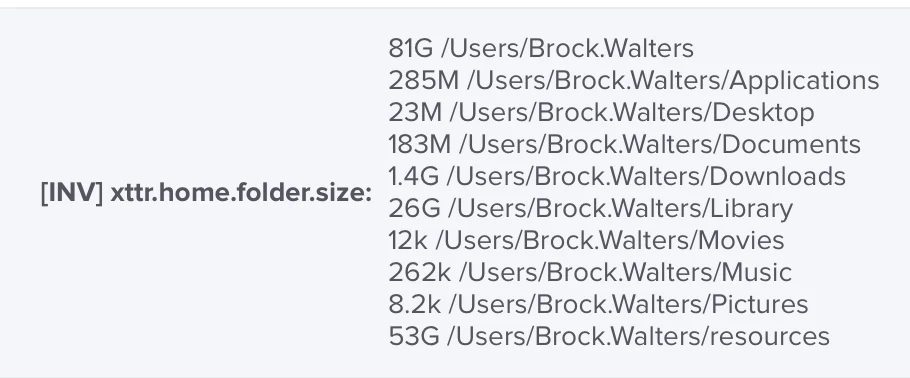
I then used the Jamf API & a little shell fu to calculate totals (there was some additional screwing around with bc & in spreadsheets after this 😐):
#!/bin/zsh

# set -x
# trap read debug

apiuser=''
apipswd=''
jamfurl=''
eastrng=''

echo 'Username,Users,Applications,Desktop,Documents,Downloads,Library,Movies,Music,Pictures,Public' \
    > ~/Desktop/sizes.csv

jamfids()
{
    apidata=$(/usr/bin/curl -sS -X GET -H 'accept: application/xml' \
        -u "$apiuser:$apipswd" "$jamfurl/$1")
    arrsize=$(echo "$apidata" | /usr/bin/xmllint --xpath "//size/text()" -)
    for ((i=0;i<=$arrsize;i++))
    {
        echo "$apidata" | /usr/bin/xmllint --xpath "concat(//$2[$i]/id/text(),' ')" -
    }
}

/bin/sleep 1
arr=($(jamfids computers computer))

for i in "${arr[@]}"
do
    szdat=$(/usr/bin/curl -Ss -X GET -H 'Accept: application/json' \
        -u "$apiuser:$apipswd" "$jamfurl/computers/id/$i" \
        | /opt/homebrew/bin/jq ".[] | .extension_attributes[] | select(.name == \"$eastrng\") | .value" \
        | /usr/bin/sed 's/"//g')
    /bin/sleep 1

    if [ -z "$szdat" ]
    then
        unset szdat; continue
    else
        usrnm=$(/usr/bin/curl -Ss -X GET -H 'Accept: application/json' \
            -u "$apiuser:$apipswd" "$jamfurl/computers/id/$i" \
            | /opt/homebrew/bin/jq '.computer.general.name' \
            | /usr/bin/sed 's/"//g')
        /bin/sleep 1
        users=$(echo "$szdat" | /usr/bin/sed -n '1p' | /usr/bin/awk '{print $1}')
        appls=$(echo "$szdat" | /usr/bin/awk "/\/Users\/.*\/Applications$/{print \$1}")
        dsktp=$(echo "$szdat" | /usr/bin/awk "/\/Users\/.*\/Desktop$/{print \$1}")
        dcmnt=$(echo "$szdat" | /usr/bin/awk "/\/Users\/.*\/Documents$/{print \$1}")
        dwnld=$(echo "$szdat" | /usr/bin/awk "/\/Users\/.*\/Downloads$/{print \$1}")
        libry=$(echo "$szdat" | /usr/bin/awk "/\/Users\/.*\/Library$/{print \$1}")
        movie=$(echo "$szdat" | /usr/bin/awk "/\/Users\/.*\/Movies$/{print \$1}")
        music=$(echo "$szdat" | /usr/bin/awk "/\/Users\/.*\/Music$/{print \$1}")
        pctrs=$(echo "$szdat" | /usr/bin/awk "/\/Users\/.*\/Pictures$/{print \$1}")
        publc=$(echo "$szdat" | /usr/bin/awk "/\/Users\/.*\/Public$/{print \$1}")
        echo "$usrnm,$users,$appls,$dsktp,$dcmnt,$dwnld,$libry,$movie,$music,$pctrs,$publc" \
            >> ~/Desktop/sizes.csv
        unset szdat usrnm users appls dsktp dcmnt dwnld libry movie music pctrs publc
    fi
done
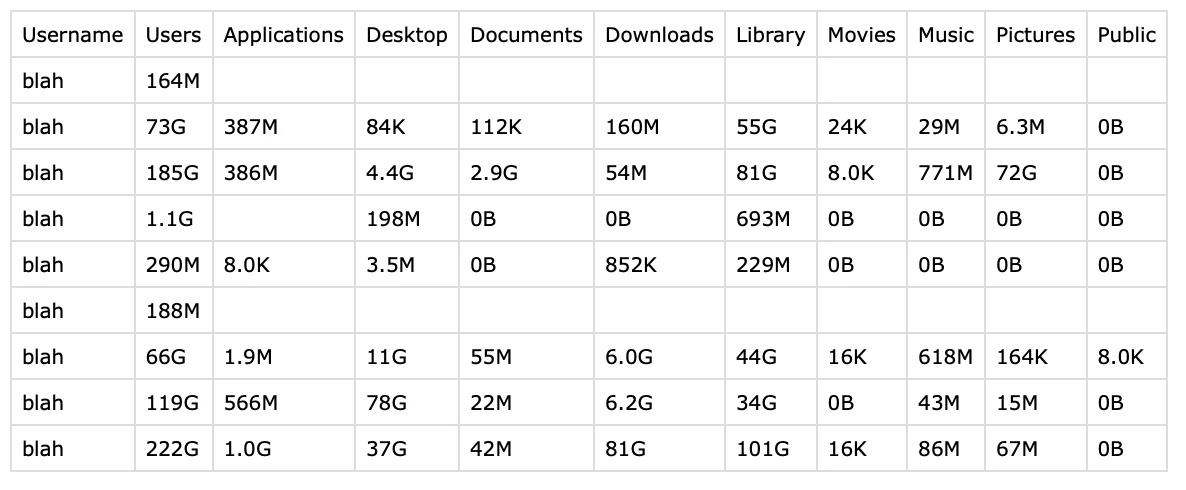
Sample of .csv output:
Enjoy!
Source: https://community.jamf.com/general-discussions-2/super-size-me-27797