It is amazing how systems can be connected today compared to 10-15 years ago.
Enterprise chat platforms were nascent, but ascendant then. Now, all sorts of fancy stuff probably happens in your chat app. Maybe you:
- get notifications about computers & servers being configured
- make tickets in a help desk system
- do AI searches with bots in Salesforce data
- get AI-generated sentiment summaries from customer calls
The sky is the limit! (Well, the sky, the amount of 💰 you have to spend on integrations, the complexity of your tools & the patience your IT person has to configure all of it…)
That said, Macs still work pretty much the way they did back then & I have always been a proponent of local notifications.
Sometimes, a triggered local notification is the right thing to do. But, sometimes, “people” (I will just call them “people”) devise very complicated designs for something that could be simple.
For example:
Say a power user is editing lots of video. They have a fast computer but it only has a 512GB internal drive. Depending on what they’re doing with edits 512GB can get chewed up pretty fast. Suppose this person has an incident - their drive filled up & their computer became unusable.
If this is not something you’ve experienced on a Mac lately, it’s still the same kind of problem it’s always been. When a Mac drive fills up, macOS loses the ability to write temp files & thus loses its mind.
So, this complicated person doing this kind of complicated thing wants a complicated solution for a very real problem:
“Hey, since my computer is managed & the management system knows how much disk space I have, can I get a Slack notification when my drive is full?”
Yes, complicated person, you could. Or, you could have a Launch Daemon running that checks for this locally so you will get the warning even if you are not connected to a network, like this:
#!/bin/bash
#shellcheck disable=SC2154


# set.disk.warn.sh @2026 Fleet Device Management


# paths
plstpth="/Library/LaunchDaemons/com.disk.warn.plist"
scptpth="/opt/disk.warn.sh"


# write out script if not found
if [ ! -f "$scptpth" ]
then

/bin/cat << 'EOF' > "$scptpth"
#!/bin/sh

dskusd="$(/usr/bin/osascript -l 'JavaScript' -e "var freeSpaceBytesRef=Ref(); $.NSURL.fileURLWithPath('/').getResourceValueForKeyError(freeSpaceBytesRef, $.NSURLVolumeAvailableCapacityForImportantUsageKey, null); Math.round(freeSpaceBytesRef[0].js / 1000000000)")"
dsksiz="$(/usr/libexec/PlistBuddy -c 'print AllDisksAndPartitions:0:Size' /dev/stdin <<< "$(/usr/sbin/diskutil list -plist disk0)")"
dskttl="$((dsksiz/1000000000))"
dskpct=$(( dskusd * 100 / dskttl ))

if [ "$dskpct" -lt 10 ]
then
	  /usr/bin/osascript -e "display dialog \"Your system disk has 10% or less capacity available.\" buttons {\"OK\"} default button 1 with title \"Disk Space Warning\" with icon file \"System:Library:CoreServices:CoreTypes.bundle:Contents:Resources:AlertStopIcon.icns\""
fi
EOF

/bin/chmod 755 "$scptpth"
/usr/sbin/chown 0:0 "$scptpth"

fi


# write out launch daemon if not found
if [ ! -f "$plstpth" ]
then

/bin/cat << EOF > "$plstpth"
<?xml version="1.0" encoding="UTF-8"?>
<!DOCTYPE plist PUBLIC "-//Apple//DTD PLIST 1.0//EN" "http://www.apple.com/DTDs/PropertyList-1.0.dtd">
<plist version="1.0">
  <dict>
    <key>Label</key>
      <string>disk.warn</string>
    <key>ProgramArguments</key>
      <array>
        <string>/bin/sh</string>
        <string>$scptpth</string>
      </array>
    <key>RunAtLoad</key>
      <true/>
	  <key>StartInterval</key>
	  <integer>60</integer>
  </dict>
</plist>
EOF

/bin/chmod 644 "$plstpth"
/usr/sbin/chown 0:0 "$plstpth"
/usr/bin/plutil -convert binary1 "$plstpth"

# start launch daemon
/bin/launchctl bootstrap system "$plstpth"

fi
Every 60s annoying enough?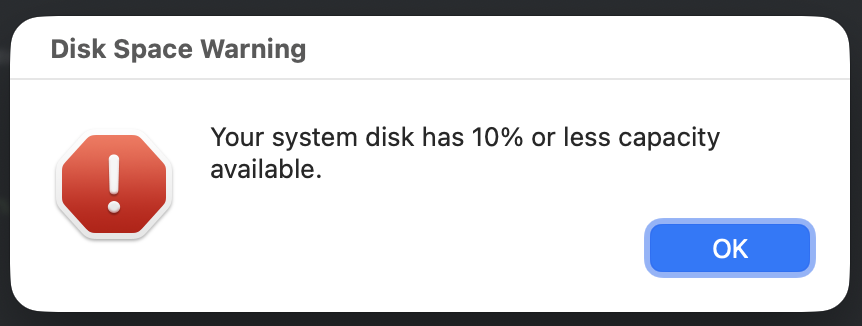
Highlights:
VolumeAvailableCapacityForImportantUsageKeyaccurately collects free disk space viaJXAdiskutil list -plistis parsed withPlistBuddy& prevents goofy parsing of the pretty printed form- simple bash math
osascriptgives us a plain old AppleScript modal to warn the user about havingx%disk space free- Writing out the script locally lets us create a Launch Daemon to execute it for the disk check
- No external dependencies
That’s it.
Maybe these solutions won’t survive. Maybe they shouldn’t? I don’t know. I just don’t know why everything always has to be as complicated as possible.