NOTE: These posts are being re-created from old Jamf Nation posts not because they are the best but because they may have useful things that were mangled in the Jamf Nation transition to its most recent hosting platform.
That, & they were always supposed to be blog posts anyway… I didn’t have a blog then.
tl;dr: This script is dumb. Do not read this.
Long version: I have seen lots of “curl the package then install the package” scripts. Some are ghastly, some are complicated (ahem, _APS…)
If you are using AutoPkg or Munki or [fill-in-the-blank-solution] you don’t need this. Perhaps we are getting something awesome from Jamf soon that precludes this nonsense? If so, I will be in the front row cheering & gladly using it.
Until then, here is a simple script / workflow for remediating Google Chrome.
Why?
- Maybe your previous administrator decided to block automatic updates.
- Maybe there was a Google Chrome CVE (like recently) so you had to upgrade it.
Another reason: to talk about scripting logic generally.
#!/bin/sh


# if Google Chrome is installed, collect the version
googpth='/Applications/Google Chrome.app/Contents/Info.plist'

if [ -e "$googpth" ]
then
    googvrs="$(/usr/libexec/PlistBuddy -c "print CFBundleShortVersionString" "$googpth")"
else
    >&2 echo "Google Chrome not installed. Exiting..."; exit
fi


# if the current stable version available matches or is older than the installed version, exit
googstb="$(/usr/bin/curl -sS https://omahaproxy.appspot.com/history | /usr/bin/awk -F ',' '/mac,stable/{print $3}' | /usr/bin/sed -n '1p')"
googchk="$(echo "$googstb\\n$googvrs" | /usr/bin/sort -r --version-sort | /usr/bin/sed -n '1p')"

if [ "$googstb" = "$googvrs" ] || [ "$googchk" = "$googvrs" ]
then
    >&2 echo "Google Chrome:\\n\\tcurrent version = ${googstb}\\n\\tinstalled version = ${googvrs}\\nExiting..."; exit
fi


# install the current stable version available if it is newer than the installed version
# if it is not running, download current version & silently install
# if it is running, prompt the user to install with deferral option
googcrl='https://dl.google.com/chrome/mac/stable/accept_tos%3Dhttps%253A%252F%252Fwww.google.com%252Fintl%252Fen_ph%252Fchrome%252Fterms%252F%26_and_accept_tos%3Dhttps%253A%252F%252Fpolicies.google.com%252Fterms/googlechrome.pkg'
googpid="$(/usr/bin/pgrep 'Google Chrome')"
googpkg="/private/tmp/googlechrome $googstb.pkg"

>&2 echo "Google Chrome:\\n\\tcurrent version = ${googstb}\\n\\tinstalled version = ${googvrs}\\nAttempting upgrade..."

if [ -z "$googpid" ]
then
    >&2 echo "...downloading & installing googlechrome $googstb.pkg"
    /usr/bin/curl -sS "$googcrl" -o "$googpkg"; /bin/sleep 2
    /usr/sbin/installer -dumplog -pkg "$googpkg" -tgt /; /bin/sleep 2
    >&2 echo "cleaning up..."
    /bin/rm -rf "$googpkg"
else
    >&2 echo "attempting to execute Google Chrome 20220303 Install id=1305..."
    /usr/local/jamf/bin/jamf policy -event 'InstallGoogleChrome'
fi
Research Link to heading
- How do you check the current version of the app on the system?
- How do you determine the current available version?
- How do you get the current available package?
You may have a script you’ve used in the past, a “recipe”, snippets from Jamf Nation, StackOverflow, etc. Get the information & assets you need.
Logic Link to heading
I start with comments that I eventually replace with code. There are 3 cases to handle:
- The installed version matches the current “stable” version available.
- The installed version is newer than the current “stable” version available. (Some kind of dev or beta version.)
- The installed version is older than the current “stable” version available.
For cases 1 & 2, no action is needed. Case 3 requires an upgrade.
The 1st 2 sections of the script handle cases 1 & 2.
- If Google Chrome is installed, collect the version in a variable.
- If Google Chrome is not installed, exit. (Could you do this differently? Sure, but, I don’t like “nesty” conditionals.)
- Collect the Google Chrome current “stable” version in a variable.
- Sort these 2 variables using
sort -r --version-sort
Why use sort?
Link to heading
The Google Chrome version is in semver format (e.g., 104.5103.64). To the shell, this is a string.
This means the test commands (i.e., the brackets) are comparing strings, not evaluating integers (“greater than” or “less than”). The version strings could be broken into integers at the field separator (the “dot”), or you could do your own regex nonsense (which you should not do) but that would mean more variables & lines…
sort -r --version-sort does mathematical evaluation by handling semver strings as integers for you.
Using -r (reverse) means the newest version string of the 2 being compared will sort to the top of the list. We can use this behavior, but, this is also where the logic gets a bit tricky…
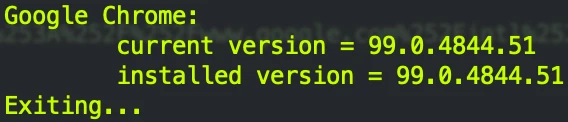
Case 1: Link to heading
$googstb matches $googvrs
This is the case 1 exit condition. You’re done!
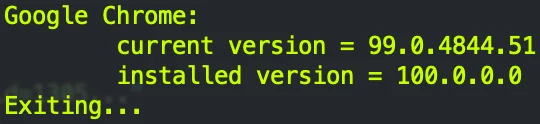
Case 2: Link to heading
$googchk matches $googvrs
The case 2 exit condition: if the installed Google Chrome version is newer than the current “stable” version, the installed version will always sort to the top.
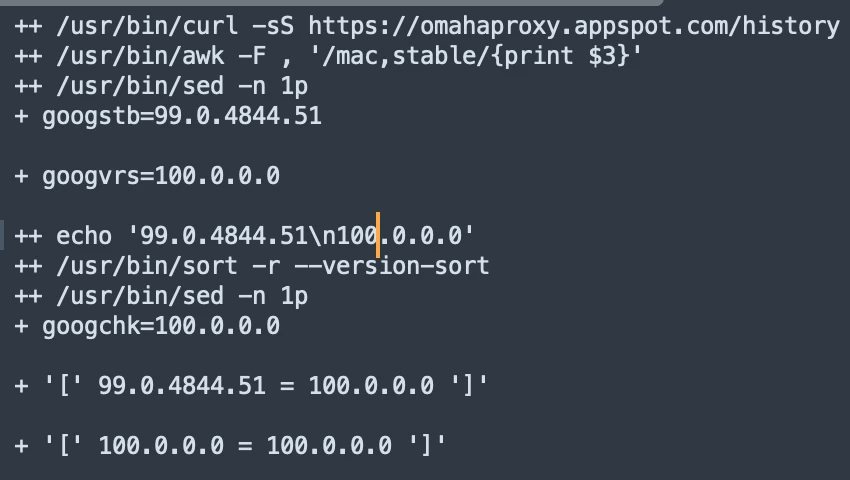
This is the output of stepping through the script using set -x…
Case 3: Link to heading
$googchk does not match $googvrs
If the installed version is older than the current “stable” version, the current “stable” version will always sort to the top.
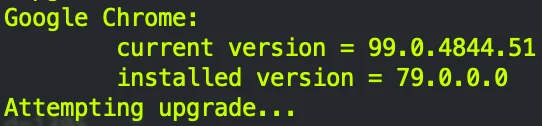
So, the script will proceed to the 3rd section where install stuff happens:
- Put the URL for getting the
.pkgin a variable. - Get the PID for Google Chrome if it’s open.
- Create a filepath for the
.pkgdownload. - If Google Chrome is not running (i.e., no PID):
- Download the
.pkg, install it & delete the.pkg(i.e., clean up) after the install is complete.
- Download the
- If Google Chrome is running:
- Be nice to your users by calling a separate Jamf Pro policy to install Google Chrome with user interaction & a deferral option. (Or, not.)
You may not like the code style I use. You may not like that I use awk & sed. My hope, though, is that this post transcends all that & helps those of you whose questions about doing this kind of thing are something like “How do I do this kind of thing?”
Source: https://community.jamf.com/t5/jamf-pro/googalogically-speaking/m-p/260439