These posts are being re-created from old Jamf Nation posts not because they are the best but because they may have useful things that were mangled in the Jamf Nation transition to its most recent hosting platform.
That, & they were always supposed to be blog posts anyway… I didn’t have a blog then.
I was using du the other day to create an extension attribute & noticed that it now has a helpful option which obviates some ugly math:
--si“Human-readable” output. Use unit suffixes: Byte, Kilobyte, Megabyte, Gigabyte, Terabyte and Petabyte based on powers of 1000.
This is nice because the macOS GUI shows file / folder sizes (& has for a while…) using 1000-byte blocks. My Mac on Big Sur does not show the --si option so I am assuming this is a Monterey thing? Not sure…
E.g., you may have run du in a script in the past & got a result like this:
% du -h -s ~
29G    /Users/Brock.Walters
So your boss says “Great, how come ‘Get Info’ says 32GB huh Mr. Smarty Script Guy?”
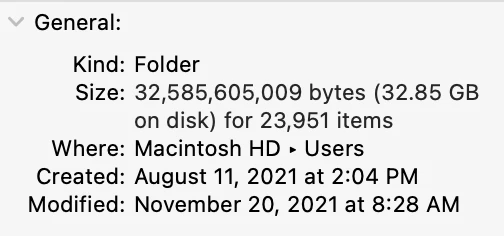
Well,
- Rounding
- 1024-byte blocks vs. 1000-byte blocks
The solution was maybe something like this:
% echo "scale=1; \
$(du -s ~ \
| awk '{print $1}')/2000000" \
| bc \
| awk '{print int($0+0.5)"G"}'
31G
Which, let’s face it, is gross.
The --si option makes all of that unnecessary because it calculates in 1000-byte blocks!
% du --si -s ~
32G    /Users/Brock.Walters
Source: https://community.jamf.com/general-discussions-2/gnu-new-du-binary-option-in-macos-12-monterey-26025